.gif)
Trusted by 10,000+ Money Book Users
.avif)
What's The Money Book?
Take Control of Your Finances with Ease: Say goodbye to manual transaction entry- the Money Book 2.0 automatically uploads everything for you, so you can effortlessly stay on top of your spending. Plus it works seamlessly with every currency, making it perfect for anyone, anywhere.
And you’ll get access to powerful features like:
- Debt Payoff Planner: The fastest & cheapest way to pay off your debt with a personalized plan.
- Emergency Fund Calculator: Build your safety net with a clear, easy-to-follow guide.
- Net Worth Tracker: Get a full view of your financial health and progress over time.
- Private & Secure: Your data is yours alone. We ensure your information is protected.
- Future You: A roadmap that shows you exactly what steps to take to achieve your financial goals.
Here's How It Works:
(It's Super Simple)
Step #1
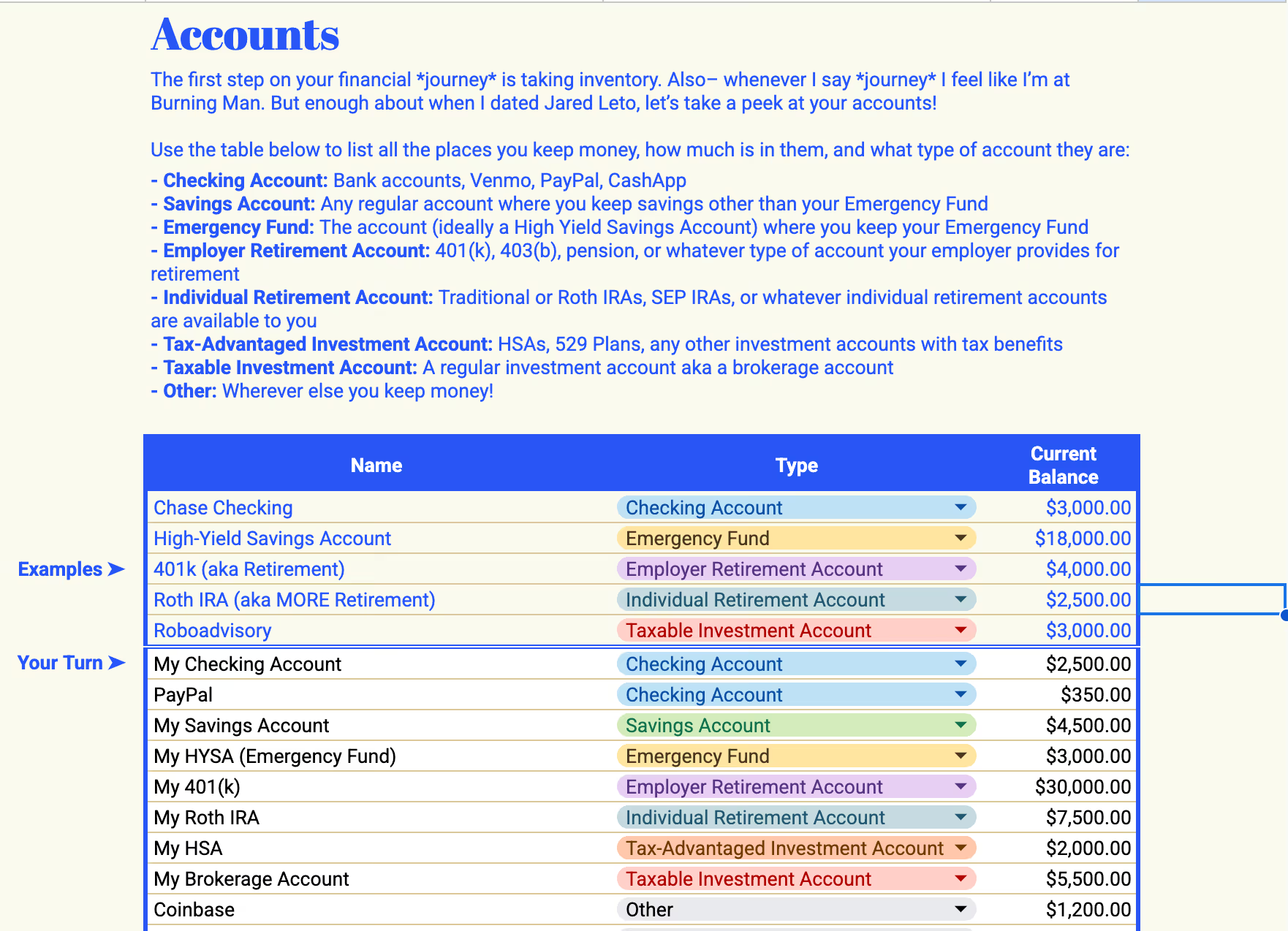
Take Inventory
Before we make money moves, we need to know where you stand. The first thing you’ll do in The Money Book 2.0 is take stock of your:
Income sources – Salary, side hustles, freelancing, passive income, all of it.
Bank accounts & savings – Checking, emergency fund, high-yield savings.
Debt & liabilities – Credit cards, student loans, car payments, mortgages.
Investments – 401(k), Roth IRA, brokerage accounts.
Step #2
Track Your Spending
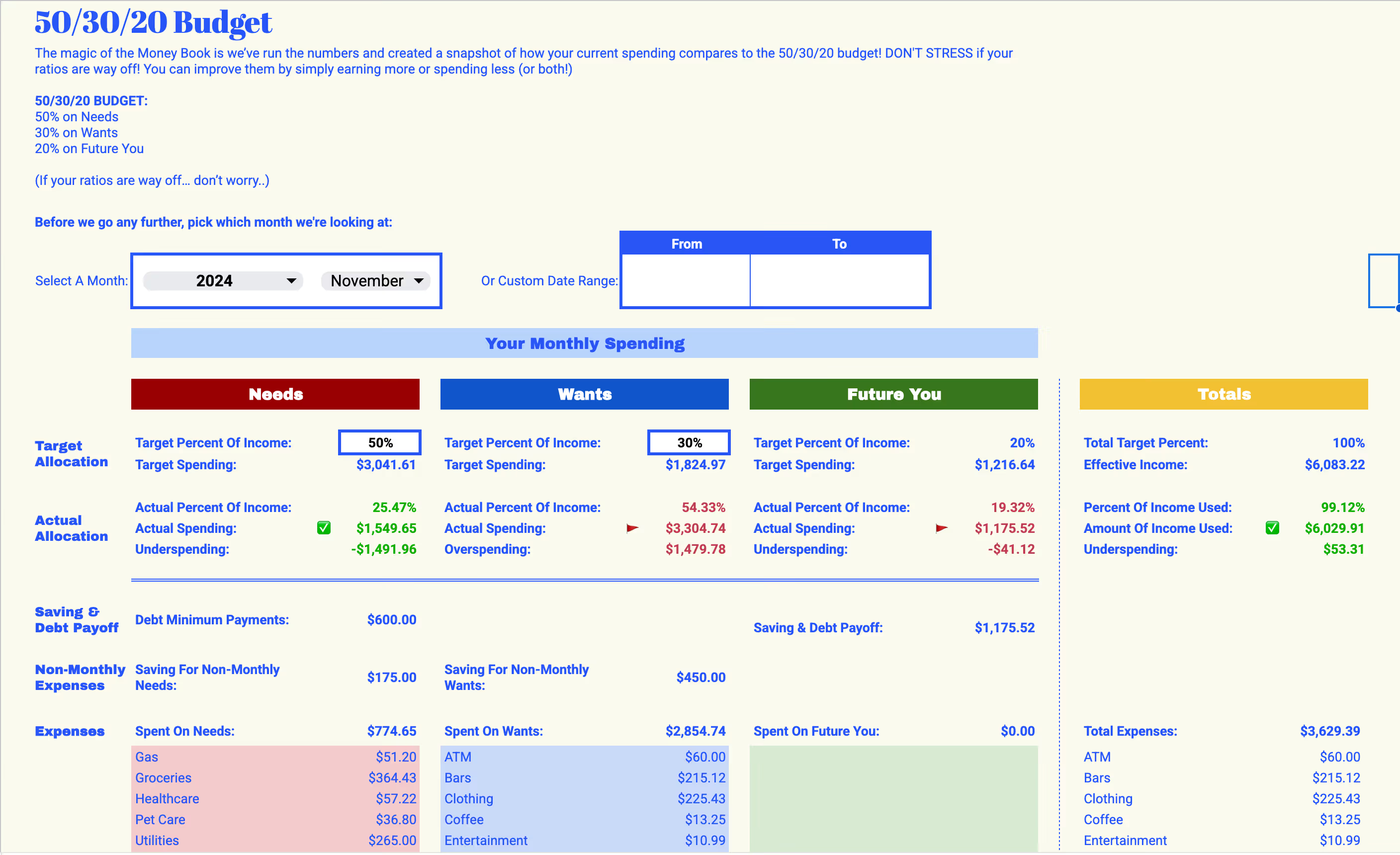
Forget manually logging every latte. The Money Book 2.0 now has automatic transaction uploads—so you can import your spending without the headache. Here’s what happens next:
- Your transactions get categorized (rent, groceries, takeout, fun money, etc.).
- You see exactly how your spending stacks up against the 50/30/20 rule
- If your spending is off-balance, The Money Book shows you exactly where to adjust.
Step #3
Make Your Money Work For You
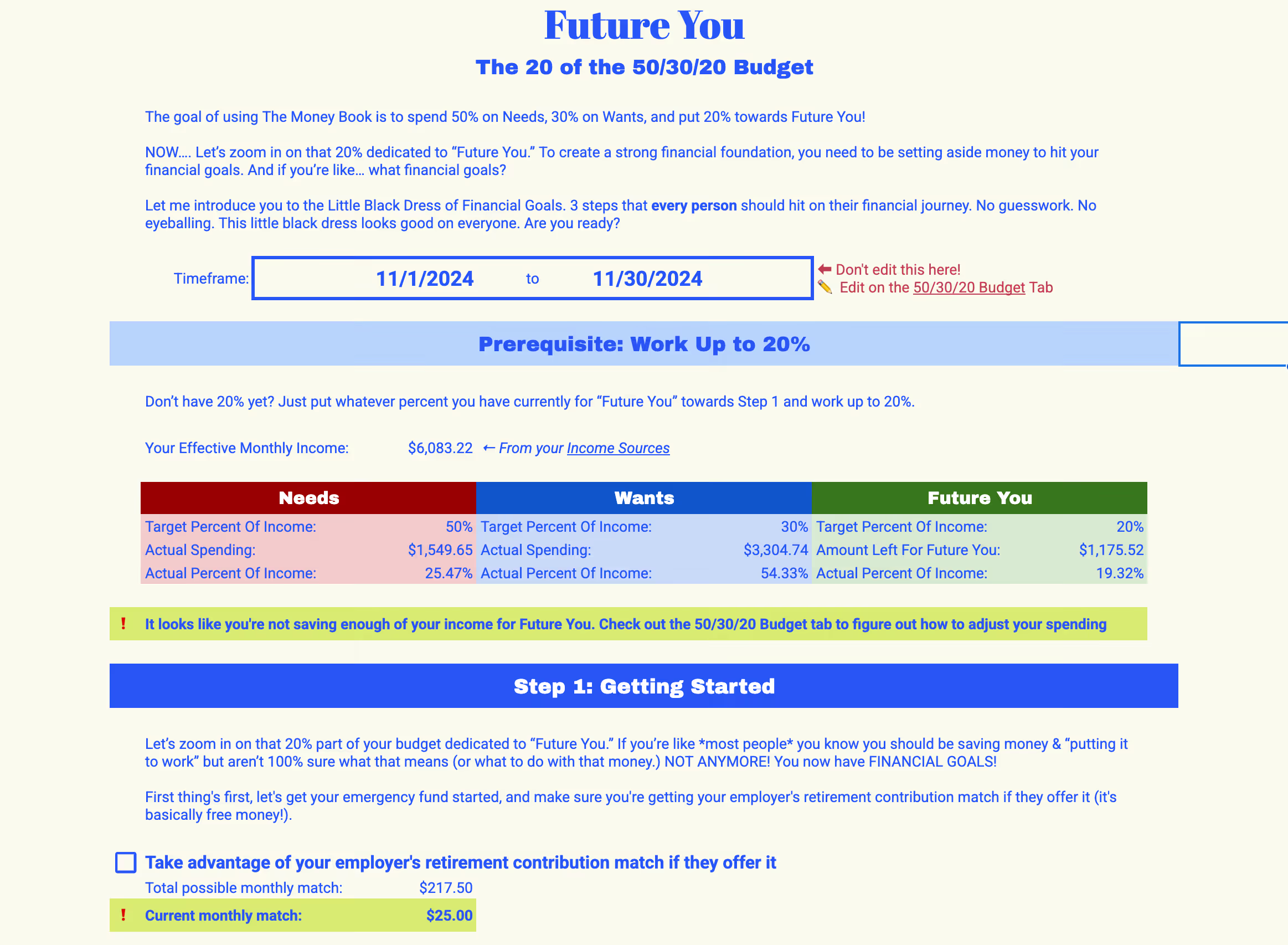
This is where we turn tracking into wealth-building. With The Money Book 2.0, you’ll get:
The Future You Tab: See what you should be investing, saving, and paying off to hit your big goals
Savings Automation: Make sure every dollar has a job (emergency fund, Roth IRA, house down payment, etc.).
Debt Payoff Planner: A clear roadmap to get rid of debt while still living your life.
Step #4
Repeat With Monthly Money Date
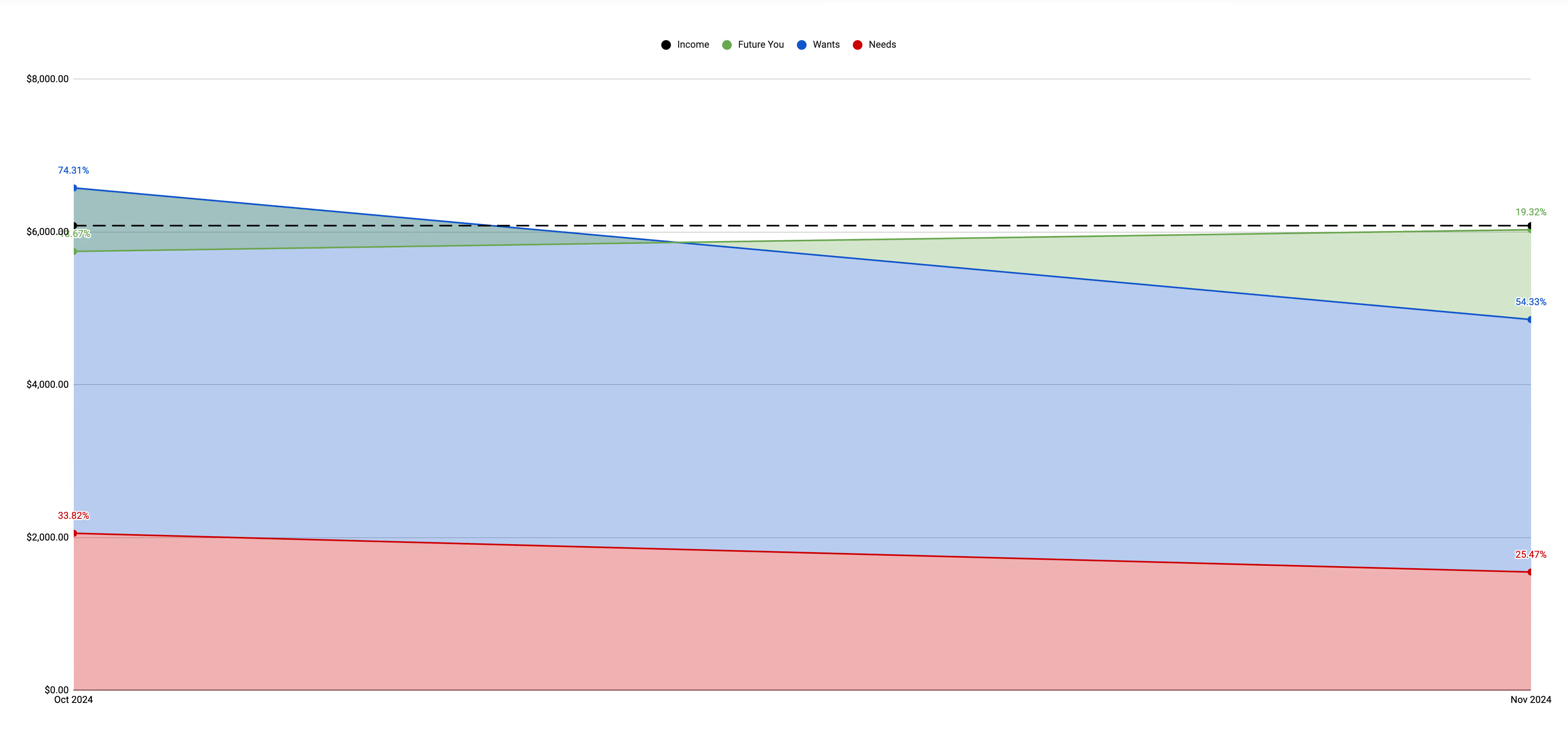
The real secret to financial success? Consistency. Once a month, you’ll sit down for your Money Date to:
- Review last month’s spending and savings.
- Adjust your budget based on what’s coming up.
- Track progress toward your goals (hello, growing net worth!).
- Celebrate your wins—because taking control of your money is a flex.
FAQ
What is The Money Book 2.0?
The Money Book 2.0 is a powerful, easy-to-use financial spreadsheet designed to help you take control of your finances. It’s like a budgeting app, but better – it keeps your data private and grows with you as your financial goals evolve.
Does The Money Book 2.0 only work in Google Sheets?
Yes—The Money Book 2.0 is built specifically for Google Sheets so that it can be accessible, easy to use, and update automatically (hello, transaction uploads!).
No special software required—just a Google account.
It works on mobile and desktop. And since it’s in your Google Drive, you own your data (not some random app)
If you're used to Excel or other platforms, don’t worry—Google Sheets is super intuitive and we include step-by-step video tutorials to make it easy-peasy.
Why should I use The Money Book instead of an app?
Unlike apps, The Money Book offers complete privacy, greater flexibility, and a clear, easy-to-understand layout. Plus, with features like automatic transaction uploads, it’s just as convenient as an app but much more powerful.
What’s new in The Money Book 2.0?
+ Automatic transaction uploads for seamless tracking.
+ Global optimization for any currency (e.g., USD, Euro, Pound).
+ Support for freelancers with variable income.
+ Tools for shared finances with your partner.
+ Emergency fund calculator, debt payoff planner, and progress tracker.
+ Video tutorials to guide you through every step.
Do I need the Money Book 2.0 if I already have the first version?
Yes, and here’s why! While the first Money Book is amazing, the 2.0 version is a major upgrade based on feedback from thousands of users. Here’s what’s new:
- Automatic Transaction Uploads: Save time by importing your transactions directly into the spreadsheet.
- Global Optimization: Now supports multiple currencies (like Euro and Pound) and adjusts for regional financial terms.
- Freelancer-Friendly: Perfect for managing variable income.
- Shared Finances Support: Easily track multiple income sources if you share money with a partner.
- New Tools: Emergency fund calculator, debt payoff planner, and progress tracker to keep you motivated.
- Step-by-Step Tutorials: Video guides to help you get the most out of every feature.
Even if you’ve loved using the first Money Book, the 2.0 version makes managing your finances even easier, more powerful, and tailored to your unique needs. Think of it as upgrading your phone – the first version worked great, but the 2.0 is faster, smarter, and designed to grow with you.
Who is The Money Book 2.0 for?
Anyone who wants to take control of their finances! Freelancers, couples managing shared finances, or anyone looking to build wealth with a simple and effective system.
How does the automatic upload feature work?
The Money Book 2.0 connects with your bank to automatically import your transactions, so you spend less time entering data and more time focusing on your goals.
Can I use The Money Book 2.0 if I don’t live in the US?
Yes! The Money Book 2.0 now supports multiple currencies (like Euro and Pound) and regional financial terms, making it accessible worldwide.
Do I need to know spreadsheets to use The Money Book?
No spreadsheet skills are required! The Money Book 2.0 is pre-formatted and comes with simple instructions, so you can jump right in without any technical knowledge.
What if I miss a month?
No problem. The Money Book is designed to be flexible. You can pick up right where you left off and keep tracking your progress.
What happens after I buy it?
You’ll receive a downloadable version of The Money Book 2.0, along with video tutorials to help you get started right away.
What if I need help using The Money Book?
We’ve got you covered! The 2.0 version includes video tutorials, and our support team is always here to answer any questions.
How often do I need to use The Money Book?
We recommend scheduling a monthly Money Date to review your budget, track your spending, and set goals.